Code your model
Once your environment is set up correctly, you can start coding your model by going through the following steps.
1: Create a model.py file
Create a file named model.py file in the root/main directory of your project.
2: Import modules and define class
We will be using the Modelpy Python package to build our model. We'll also import the random module to create our initial data and mutate each node during our timestep function. Let's import our modules and then initialize our model.
from emergent.main import AgentModel
import random
import networkx as nx
import matplotlib.pyplot as plt

# Define instance
model = AgentModel()
3: Define the parameters of your model.
This will define your model's parameters. Only the parameters that are strings or numbers will be editable in the Modelpy interface.
model["num_nodes"] = 7
model["default_bias"] = 0.15

# Note that we have three graph types to choose from: [complete, wheel, cycle]
# By default, the graph is complete
model["graph_type"] = "wheel"
# We can also define our parameters with this helper function
model.update_parameters({"num_nodes": 7, "default_bias": 0.15})
4: Define your function to generate the initial_data for each node.
This will define how each node is initialized or reset in the Emergent interface.
def generateInitialData(model: AgentModel):
    return {"x_location": random.randint(1, 50), "y_location": random.randint(1, 50)}

model.set_initial_data_function(generateInitialData)
5: Define the timestep function.
This will define the logic that your model will perform at every timestep.
def generateTimestepData(model: AgentModel):
    graph = model.get_graph()
    for _node, node_data in graph.nodes(data=True):
        node_data["x_location"] += random.randint(-10, 10)

    model.set_graph(graph)

model.set_timestep_function(generateTimestepData)
6: Run your model
Now that you have successfully created your model, you can now run it using the following code:
# Initialize the graph
model.initialize_graph()

# Run for loop for number of timesteps
timesteps = 100

for _ in range(timesteps):
    model.timestep()

# Display graph
graph = model.get_graph()
nx.draw(graph)
plt.show()
Output
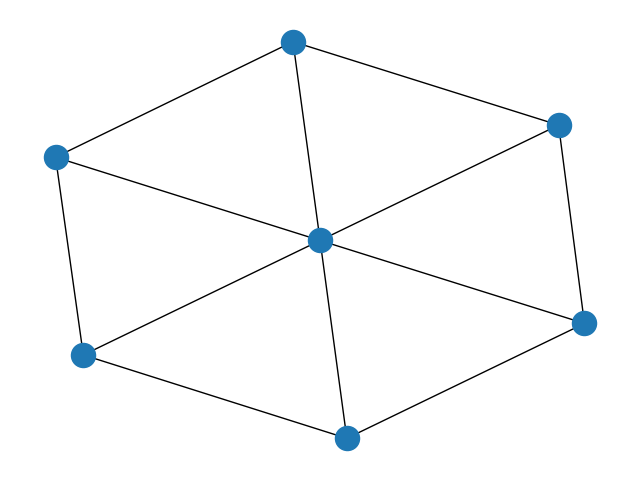 We can also run our model to convergence with the following code:
# Get the timestep at which the model converges
time_of_convergence = model.run_to_convergence()

# Print results
print(f"The model converges at {time_of_convergence}")
7: Review
Here's what the full file looks like once we're done.
from emergent.main import AgentModel
import matplotlib.pyplot as plt
import networkx as nx
import random

# Template initial data and timestep data functions


def generateInitialData(model: AgentModel):
    '''
    This is where you will generate the initial data for a node
    in your model. You can generate whatever data your model requires;
    the following is just a placeholder.
    '''
    return {"x_location": random.randint(1, 50), "y_location": random.randint(1, 50)}


def generateTimestepData(model: AgentModel):
    '''
    This is where you will define the change in data for all nodes
    in your model following a timestep. Again, the function below is
    just a placeholder.
    '''
    graph = model.get_graph()
    for _node, node_data in graph.nodes(data=True):
        node_data["x_location"] += random.randint(-10, 10)

    model.set_graph(graph)


# Define AgentModel instance
model = AgentModel()

model["num_nodes"] = 7
model["default_bias"] = 0.15

# Graph types to choose from: [complete, wheel, cycle]
# By default, the graph is complete
model["graph_type"] = "wheel"

# We can also define our parameters with this helper function
model.update_parameters({"num_nodes": 7, "default_bias": 0.15})


model.set_initial_data_function(generateInitialData)
model.set_timestep_function(generateTimestepData)

# Initialize the graph
model.initialize_graph()
# Run for loop for number of timesteps
timesteps = 100

for _ in range(timesteps):
    model.timestep()

# Print results
print(model.get_graph())
8: Make your model more interesting
You will probably want more things to happen in your model than what is described above. Feel free to use the Build your own model tab for ideas, or make something up on your own!